An instrument for macOS
Journeaz
by HumNyX
Where you wander with ease, the tracks follow.
An instrument for finding songs. Eight keys sit in front of you, each one a possible next move for the music. Press the one that pulls at you, the change lands on the next bar, and the keys light up with what could come after it. Every sound is a loop from your own sample packs.

What it is Journeaz
Journeaz is an instrument for finding songs. You do not program it and you do not arrange in it. You play it: press a key, the music takes that step on the next bar, and press by press you walk through a song while the song map draws the trail behind you. It is built for the part of music-making that is hardest to force, the first spark.
An idea machine, not a generator. Journeaz never writes a song for you. It listens to what is playing and offers you eight choices that fit, and every choice is yours. Think of a very attentive bandmate who knows every loop you own and always has eight suggestions ready. Some will surprise you. Some will be wrong for the moment, and that is fine: you just do not press them.
Every sound is a loop a musician made. Journeaz has no sounds of its own. It plays only the loops and one-shots in the folders you give it, from packs you own, so the people who make sample packs stay part of the music. When two keys offer the same part, each one names the pack it comes from, and the Library shows the pack of every loop, so you always know whose work you are playing with.
How it works As a Whole
You do not need any of this to play. It just makes the keys easier to steer.
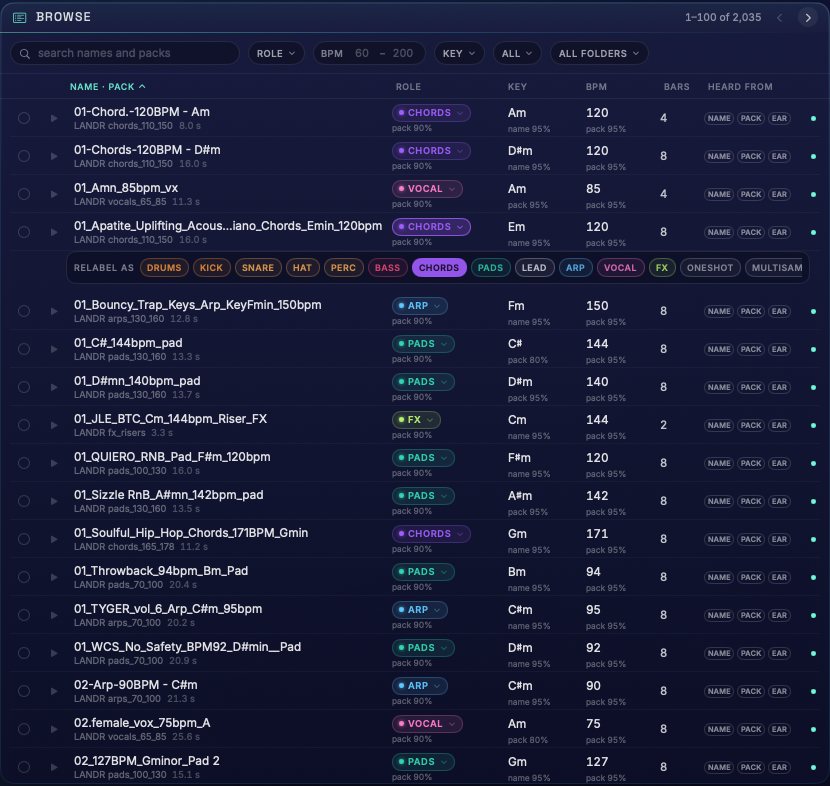
1 The Library
It listens to your loops
Add the folders where your loops live. Journeaz opens every audio file (WAV, AIFF, FLAC, MP3, M4A and OGG) and listens for:
- the tempo, by listening for the pulse;
- how many bars it runs: 1, 2, 4, 8 or 16;
- the notes actually in it, so it knows the key and whether it is major or minor;
- the role it plays: drums, bass, chords, pads, lead, arp, vocal, fx, a one-shot or a texture.
File and folder names count as evidence too, and when you correct a label yourself, your correction always wins. Your files stay exactly where they are.
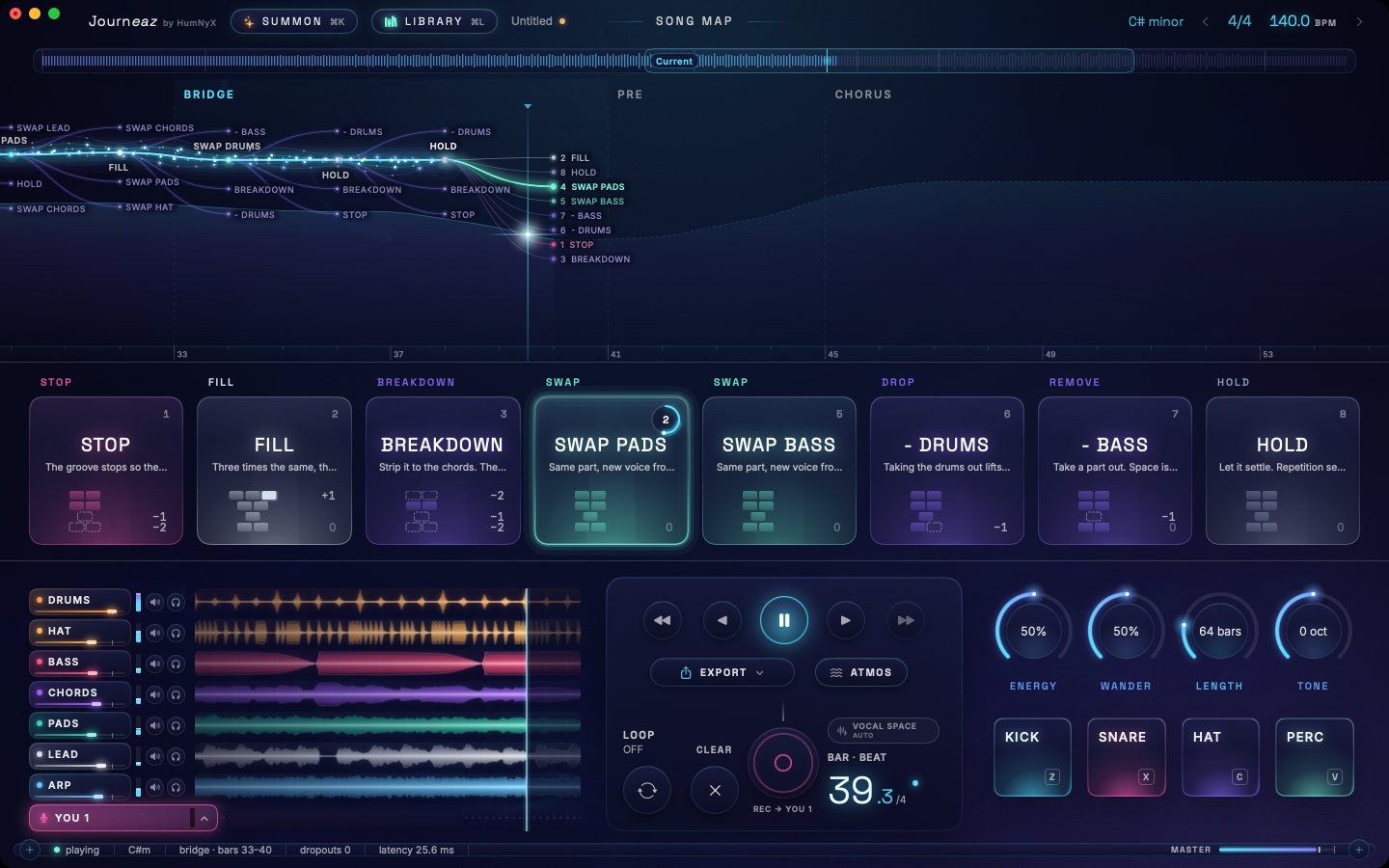
2 The brain
Eight compatible next steps, landing on the bar
For each part, Journeaz keeps a pool of loops that can play in your song without clashing: within about 8 percent of its tempo, in the same mode, and never bent more than two semitones. From those pools it builds eight moves: add a part, swap one for a loop from another pack, take one out, lift, break down, fill, stop, hold, or bring the chorus back. The line under each key says why, in plain words.
Pressing a key does not cut the music. It arms the move, and the change lands exactly on the next bar line. Change your mind before then and press another. Leave it alone and the song keeps moving: after about eight bars without a change, it varies itself.
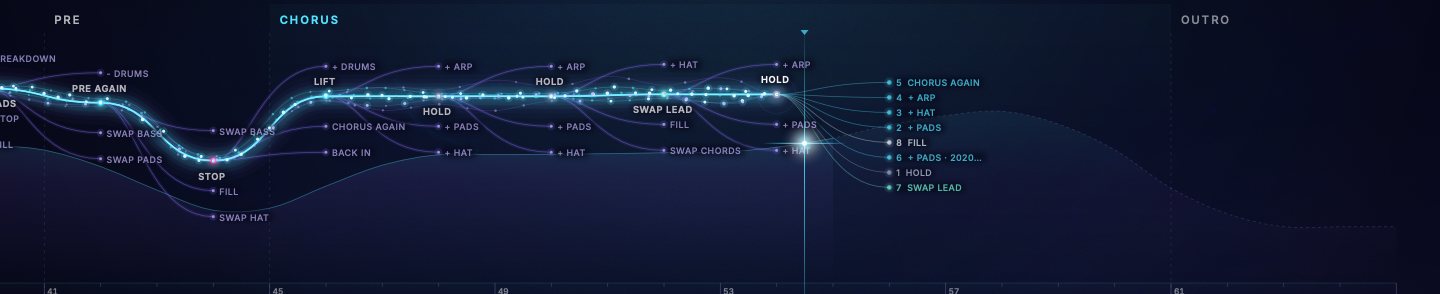
3 The map
The song is the path you took
Every press is written down: which loops played, from which bar, at what level. That list of steps is the song. The map draws it as a glowing path, with the moves you did not take branching off it as faint labels and the song's energy as a soft curve behind it. Press ⌫ to step back, and the keys offer exactly what they offered at that fork.
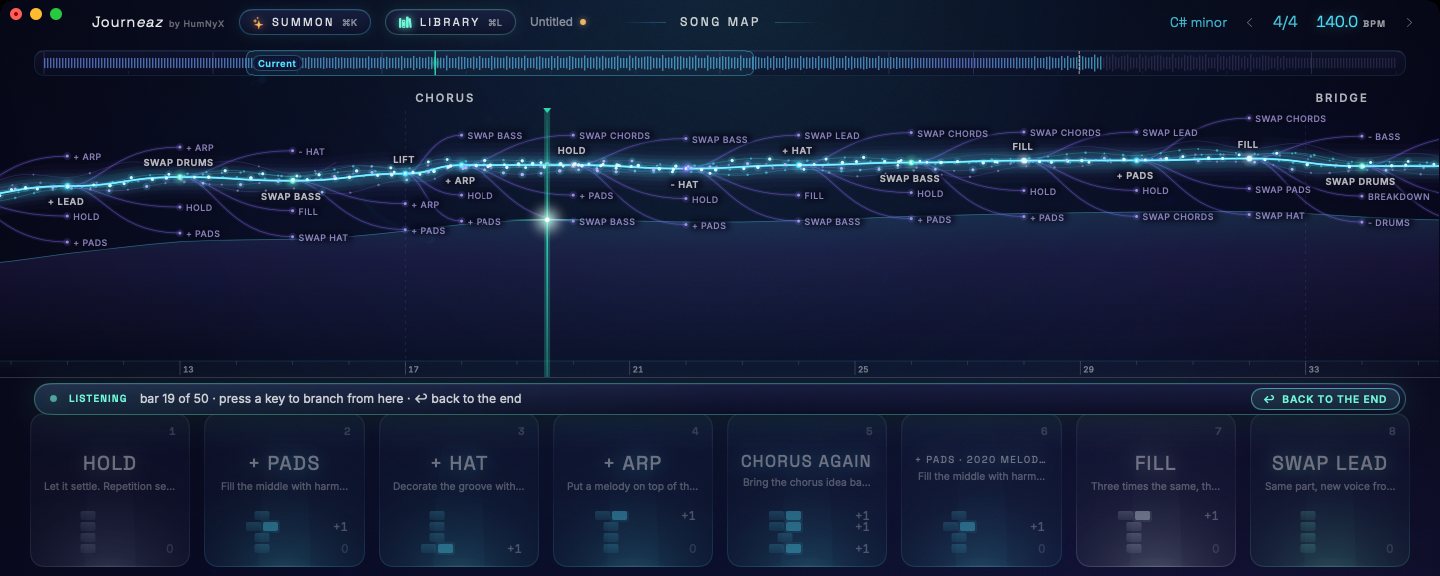
4 Review
Listening back replays it exactly
Click back on the map and Journeaz replays the path exactly as you played it: the same loops, the same changes on the same bars, your fader moves, your takes. It is the same calculation the export uses, so what you hear in review is what you get in the file.
Listening back never erases anything. Press a key from there and Journeaz asks first ("branch here?") and says how many later steps it would discard.
What you can do The Instrument
Everything here is in the build you download today
Eight keys, and branching
Press 1 to 8, or click a key. ⌫ undoes one step, and you can go back to any earlier point and take a different branch. Four knobs shape it: ENERGY and WANDER lean the offers (WANDER sets how far into your library it reaches), LENGTH sets the song from 16 to 256 bars, and TONE moves the top melodic part by whole octaves.
Four pads, Z X C V, play drum hits from your library the moment you hit them, not snapped to the grid, so your timing is the groove.
Takes, from a mic or an instrument
Sing over it, play a guitar line, hum a melody. Press R: a one-bar count-in, then you record from the next downbeat, in whole bars, in time. Each take gets its own lane (YOU 1, YOU 2 and so on) with a fader, mute and solo, and ⇧1 to ⇧4 bring a take in or out on the next bar.
The song never removes your recordings by itself. Only you do.
Vocal Space
Arm a take and VOCAL SPACE switches on by itself. The keys stop offering leads and vocals, the song keeps one layer fewer in verses and choruses, and while you sing the pads, chords, leads and arps open a little around where a voice lives (a gentle dip of up to 4 dB near 2.5 kHz).
The music makes room for you, instead of just getting quieter.
ATMOS
Press A for an atmosphere behind the whole song: a drone, a pad, a field recording from your library, chosen to fit the key and the mood, fading in over two bars on its own lane. Press A again for another texture at the next section; ⌥A turns it off.
ATMOS sits outside the eight keys, so it never takes a key away from the song.
Summon
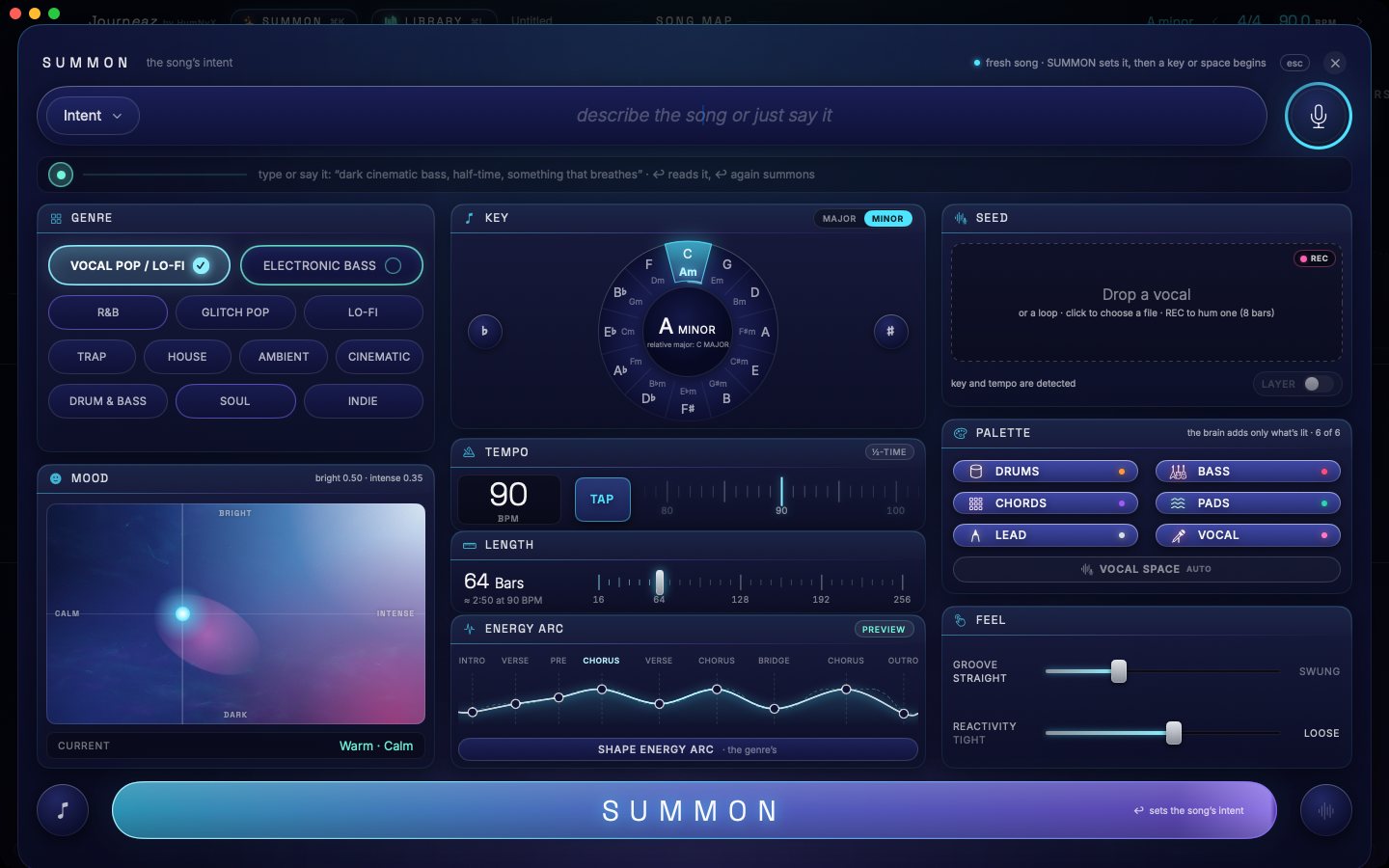
Press ⌘K and type or say what you are after, for example "lo-fi around 80 in A minor, no drums, keys and a vocal". What Journeaz understood lights up on the cards, and you can change anything by hand: genre (twelve starting points), mood, key, tempo, length, the energy arc, the palette of parts and the feel.
Drop a loop or a vocal on SEED, or hum a phrase, and Journeaz detects its key and tempo. Summon in the middle of a song and the change lands on the next bar while the music keeps going. Speech is recognised on your Mac.
The map and review
Click any bar to listen back from there. Shift-drag draws a loop of any length, ⌘-drag reshapes the energy curve ahead of you (the offers follow it), and ⌥-click past where you are sets where the song ends. ↩ takes you back to the end.
Export, with stems
Export the mix (one stereo 24-bit WAV), or the mix plus a stem for every part: drums, bass, chords, pads, lead, arp, vocal, fx, ATMOS and each of your takes. Every stem runs the full length of the song from bar 1, so they line up in any audio software.
Each export gets its own folder in ~/Music/Journeaz, with the song file inside it, so you can open it again.
Save and reopen
⌘S saves the map, every step, the mix and your takes; after the first save, Journeaz saves by itself every minute and after each step. ⌘O opens a song paused at bar 1: listen from the top, or press a key to carry on from where you stopped.
A saved song remembers which loops it used and where they live. It never copies them.
Everything you make is yours
The songs, the exports, the stems and your recordings are yours, to release, sell or share however you wish, with no credit owed and no fee. The samples inside them are still the sample makers', under the licence of the pack you bought them in, the same as in any other music software.
Bring your own sounds Your Library
You do not need a huge library. You need a varied one.
What a good library looks like
- A few hundred well-named loops are enough to start. More parts (drums, bass, chords, pads, leads, vocals) and more tempos give the keys more to offer.
- The key and tempo in the file name, like
Warm Bass Am 90bpm.wav. Most sample packs already do this. - One instrument to a folder (a folder of basses, a folder of drum loops), or say it in the name.
- Whole bars. Loops cut to exactly 1, 2, 4, 8 or 16 bars sit best.
- A few extras: short drum hits play on the pads, and long, sustained sounds (drones, pads, field recordings) become textures for ATMOS.
The first scan
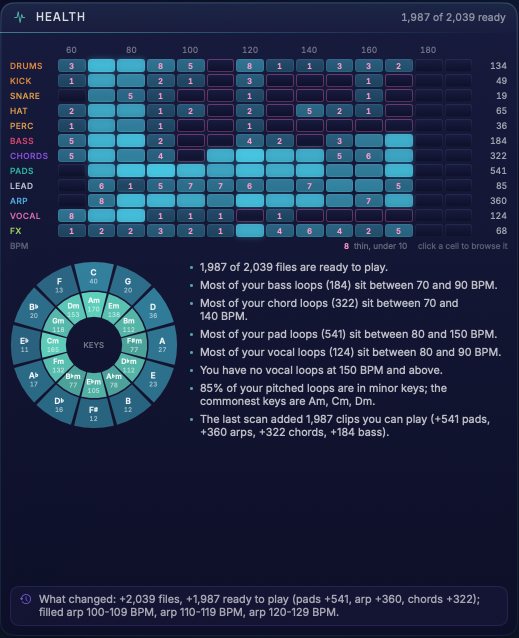
On an Apple silicon Mac, Journeaz listens to roughly 150 to 200 files a second, and the time grows in about a straight line with the size of the library. You can play with whatever is ready while it works, and later scans only listen to new and changed files.
Anything Journeaz hears wrong, you can put right in the Library: click a part, a key or a tempo and choose the right one. Your corrections survive every rescan, and once you have made a good number of them, Journeaz uses them to label new files better.
The Quality Pack
Most libraries do not need this. If your loops come from a handful of good packs, Journeaz already plays them well, and you can skip this part. It is also a big download, 552 MB, because it carries its own listening model and everything that runs it.
But if your library is more like a drawer that has been filling up for years, read on.
What it does
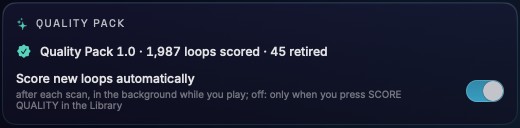
It listens to every loop you have and gives each one a score for how well it is produced. Then it quietly retires the worst-sounding few of each part (at most the bottom tenth), the thin, muddy or clipped ones every big collection picks up, so the keys stop offering them. The better loops also get a small lead when the keys choose. Nothing is deleted, moved or changed: a retired loop just sits out.
Who it is for
- A big mixed drive of sample packs.
- Loops with vague names (
loop_final_2.wav, we have all been there). - Twenty years of folders you have never quite sorted.
On the library Journeaz grew up with, about 300,000 clips, it retired 11,611 loops that would otherwise have been offered.
What to expect
It works in the background after the keys light up, so keep playing while it listens: about 20 to 25 loops a second on an Apple silicon Mac, nearer 10 when a drive is being read for the first time. 1,558 loops took about a minute, 20,000 take roughly 15 to 35 minutes, a very big library a few hours. Stop it whenever you like: it keeps every score so far, and SCORE QUALITY carries on from there.
Requirements
The same Mac as Journeaz: Apple silicon, macOS 14 or newer, and Journeaz 1.1 or newer. About 1.1 GB once installed, and about 1.4 GB of memory while it listens. Like Journeaz, it runs entirely on your Mac, with no internet connection.
Install and remove
- Open Journeaz-Quality-Pack-1.0.dmg and drag Journeaz Quality Pack onto Applications, next to Journeaz.
- Open Journeaz. It finds the pack by itself, and scoring starts after the next library scan, or press SCORE QUALITY in the Library (⌘L).
To remove it, drag it to the Trash and Journeaz plays as it did before.
Credits
The pack runs Meta's Audiobox Aesthetics model (Meta AI, FAIR), unmodified, under the CC BY 4.0 licence, on PyTorch (BSD licence). The full licence texts are inside the pack. More under Credits and licences.
Get it Downloads
Both disk images are signed and notarized by Apple
Journeaz 1.1for macOS
78 MB disk image · about 218 MB installed
Apple silicon, macOS 14 or newer
Quality Pack 1.0optional, for big or messy libraries
552 MB disk image · about 1.1 GB installed
needs Journeaz 1.1 or newer
User manualJourneaz 1.1 and the Quality Pack
Every key, panel and setting, with pictures.
PDF, 32 pages, 2.6 MB
The same manual lives in the app, under Help.
Read online Download the PDFTo check a download against its SHA-256, run shasum -a 256 Journeaz-1.1.dmg (or
Journeaz-Quality-Pack-1.0.dmg) in Terminal.
Before you start Install
Requirements
Apple silicon Mac, macOS 14 or newer
A Mac with Apple silicon (M1 or later) and macOS 14 Sonoma or newer. Journeaz does not run on Intel-based Macs. 78 MB to download, about 218 MB installed.
Your own loops: a few hundred well-named ones are enough to start. Headphones, if you want to record yourself into the song.
Install
- Open Journeaz-1.1.dmg.
- Drag Journeaz onto Applications.
- Open Journeaz from Applications. macOS asks once whether to open an app downloaded from the internet: choose Open. That is the only question. Journeaz is notarized by Apple, so there is no right-click Open and no trip to Privacy & Security.
- Click ADD FOLDER and choose the folder with your loops (for a folder on an external drive, macOS checks once that Journeaz may read it). When the keys light up, press one.
Removing it
Quit Journeaz and drag it from Applications to the Trash, with the Quality Pack if you have it. Its library
index and settings stay in ~/Library/Application Support/Journeaz until you delete that folder
too; your exports and recordings in ~/Music/Journeaz are yours and stay where they are.
Questions FAQ
Does it need the internet?
No. Everything runs offline, on your Mac: no account, no sign-in, no analytics, no update checks. Even the speech for Summon is recognised on your Mac.
Does it use my samples?
Yes, and only yours. Journeaz has no sounds of its own: every bar you hear comes from the loops and one-shots in the folders you give it.
What about the packs I bought?
They stay exactly where they are. Journeaz reads the folders you choose and never copies, moves, renames or uploads a file; it keeps what it learns about them in its own index. The samples stay under the licence of the pack you bought them in, and every pack you add is a new set of paths to wander.
Can I remove the Quality Pack?
Yes. Drag it to the Trash and Journeaz plays as it did before. The scores it already made stay in the library index, so the loops it retired stay retired; correct one in the Library's Browse to bring it back.
Will it run on my Intel Mac?
No, Journeaz needs a Mac with Apple silicon (M1 or later) and macOS 14 or newer.
Credits and Licences
Journeaz
Journeaz is made by HumNyX, a project of Hummed LLC. It is licensed to one person: you may install it on the Macs you use yourself, and if a friend would like it, point them to this page. The full licence is in the app, under Help ▸ Licence. Journeaz includes Python and its libraries for the sound engine, and the Space Grotesk and Inter typefaces under the SIL Open Font License; those licences apply to those parts.
The Quality Pack
The Quality Pack runs Meta's Audiobox Aesthetics model (Meta AI, FAIR), used unmodified under the
Creative Commons Attribution 4.0 International licence (CC BY 4.0)
(model page,
paper, arXiv:2502.05139).
Parts of the model come from WavLM under the MIT licence. It runs on PyTorch (BSD licence), Python (PSF
licence) and other open-source libraries. The full licence texts are inside the pack, in
Journeaz Quality Pack.app/Contents/Resources/quality/LICENSES, and the app shows the attribution
under Help ▸ Licence.
The music
Every sound you hear in Journeaz was made by a musician: the people who record, play, program and release the sample packs in your library. Journeaz exists to put their work in your hands in a new way. If a pack keeps showing up in the songs you love, look up who made it, follow them, and buy their next one.